Zeal vs PandaDoc
PandaDoc is built for sales documents: proposals, quotes and deal rooms. Zeal is built for agreements that end their life in Word. Both send and sign. The difference is the editor. Zeal edits DOCX natively with tracked changes, then monitors obligations and renewal dates after signature. Choose PandaDoc to close deals, Zeal to manage commitments.
Comparison accurate as of October 23, 2026. Every PandaDoc claim below links to their own published page.
The trial takes a card and converts automatically after 14 days unless you cancel first. Cancel any time from account settings.
Who each one is for
Zeal suits you if
You draft, negotiate and track agreements, and the documents are the work product. Your drafts carry redlines, your exhibits carry pricing tables, and somebody needs to know what was committed to six months after signature. You want the document you negotiate and the document of record to be the same file.
PandaDoc suits you if
Your documents are proposals and quotes that close deals. You need a product catalogue, pricing tables that calculate, payment collection at signature, and a deal room your buyer can browse. The document's job is finished once it is signed, and nobody needs to monitor it afterwards.
Capability by capability
Every PandaDoc cell states what PandaDoc publishes on its own pages, with the date it was read. Where PandaDoc publishes nothing about a capability, there is no row rather than a blank one.
Document creation and editing
| Capability | Zeal | PandaDoc |
|---|---|---|
| Word-grade DOCX editing with tracked changes | Native Formatting preserved through import and export, tracked changes, clean DOCX out | Block-based editor The editor is drag-and-drop and block based. "Edit in Microsoft Word" is offered from the Starter tier upward. PandaDoc published page, read October 23, 2026. |
Also in Zeal
- Spreadsheet editing (XLS, XLSX)
- Pricing schedules, rate cards and financial exhibits edit in place, so they stay part of the same document set rather than arriving as a separate attachment.
- Presentation editing (PPT, PPTX)
- Deal summaries and board briefings are built from the agreement inside the platform, rather than in a second tool against a copy that goes stale.
- PDF viewing, redaction and editing
- Counterparty PDFs are handled in place without a separate PDF tool.
Listed because readers ask about them. PandaDoc does not publish information either way on these, so we make no claim about their support.
Contract management and monitoring
| Capability | Zeal | PandaDoc |
|---|---|---|
| AI data extraction from documents | Included on the entry tier AI review reads the agreement and surfaces terms for checking | From the Business tier AI data extraction is listed as available from the Business tier. PandaDoc published page, read October 23, 2026. |
Also in Zeal
- Obligation and renewal monitoring
- Agent-based portfolio monitoring surfaces renewal dates, obligations and deviations across the whole contract set at team tier, which is the work that otherwise lives in a spreadsheet.
Listed because readers ask about them. PandaDoc does not publish information either way on these, so we make no claim about their support.
Workflow and collaboration
| Capability | Zeal | PandaDoc |
|---|---|---|
| Intake forms and workflow automation | Included Intake forms build request-to-draft without add-on purchase | Usage credits or paid add-ons API, bulk send, web forms and workflow automation are each listed as requiring usage credits or paid add-ons. PandaDoc published page, read October 23, 2026. |
| Salesforce integration | Included One of 30+ integrations, alongside Bullhorn, JobDiva, Workday and QuickBooks | Paid add-on Listed as a paid add-on on the Business and Enterprise tiers. PandaDoc published page, read October 23, 2026. |
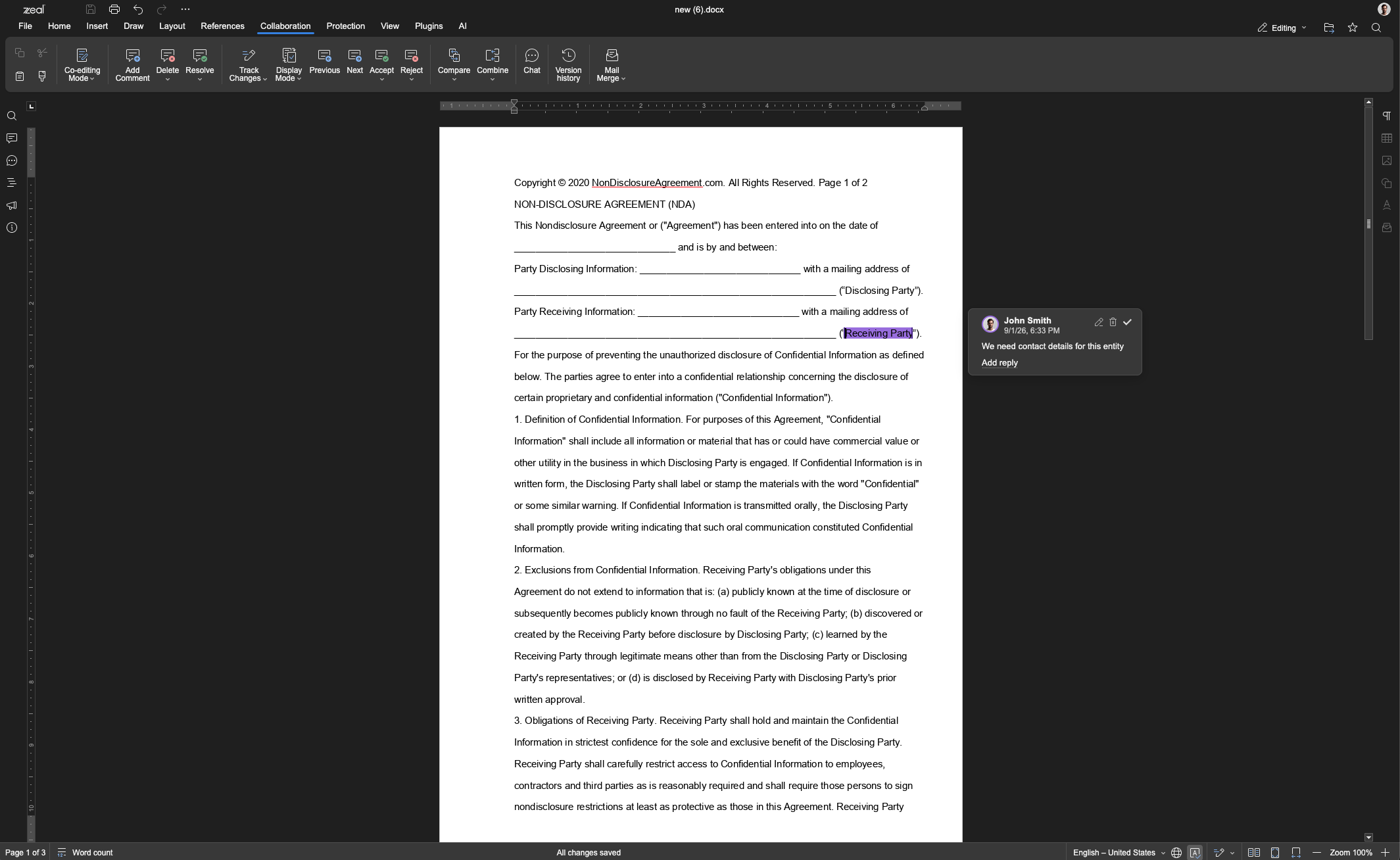
Open one of your own contracts
Import a DOCX you are working on now and see what survives the round trip. Fourteen days, and the first thing the trial asks you to do is upload a real document.
The trial takes a card and converts automatically after 14 days unless you cancel first. Cancel any time from account settings.
Where PandaDoc is the better choice
PandaDoc is built for sales documents, which is a different job from managing agreements. Its pricing tables, product catalogue and deal rooms exist to move a proposal toward a closed deal. Where a document's purpose is to win the business rather than govern what happens afterwards, that is the toolset designed for it.
It also covers things Zeal does not attempt: collecting payment at the moment of signature, quoting from a product catalogue, and giving a buyer a deal room to browse. If those are part of how you sell, they are not capabilities Zeal stands in for.
What switching from PandaDoc involves
Templates come across as DOCX. Export from PandaDoc, import into Zeal, and the formatting arrives intact rather than needing to be rebuilt block by block.
Signed documents can be imported in bulk so monitoring has a portfolio to work from on day one rather than only covering what you sign from here.
Zeal integrates with DocuSign, so a team that has standardised on it for signature does not have to change what counterparties see in order to gain contract intelligence.
See what the agents surface
Point Zeal at the agreements you have already signed and see which renewal dates and obligations come back.
The trial takes a card and converts automatically after 14 days unless you cancel first. Cancel any time from account settings.
Questions buyers ask
- Which one handles Word documents properly?
- Zeal edits DOCX natively, keeping formatting through import and export and supporting tracked changes, so the file you negotiate is the file of record. PandaDoc's editor is drag-and-drop and block based, and offers "Edit in Microsoft Word" from the Starter tier upward, which means anything needing real redlining tends to move into Word and back.
- Which one has contract monitoring?
- Zeal does. Its monitoring agents track obligations, renewal dates and deviations across the whole portfolio at team tier. PandaDoc lists AI data extraction from the Business tier, which reads data out of documents, but monitoring an agreement over its life is a different job and is not what a sales-document tool is built to do.
- Is Zeal more expensive than PandaDoc?
- Per seat, yes. Zeal is $99 a seat a month; PandaDoc publishes Starter at $19 and Business at $49. The comparison worth running is against the whole stack: if you currently pay for PandaDoc, keep Word for anything legal, and track renewal dates in a spreadsheet, Zeal replaces all three. Against one tool it looks expensive, against the stack it usually does not.
- What does the Zeal trial actually involve?
- Fourteen days on the entry tier. It takes a card at checkout and converts automatically when the trial ends unless you cancel first, which you can do any time from account settings. Anything you build during the trial carries forward, and your contracts can be exported in their original format whenever you want them.
- Can I keep using PandaDoc for proposals?
- Yes, and plenty of teams should. The two tools are aimed at different documents. If proposals and quotes close your deals, keep that where it works and use Zeal for the agreements that need negotiating, redlining and tracking after signature.
Open a real contract in the editor.
The argument on this page is about the editor, so the fastest way to settle it is to put one of your own DOCX files through it. Fourteen days on the entry tier.
The trial takes a card and converts automatically after 14 days unless you cancel first. Cancel any time from account settings.